
The easy worakround to work with Canon C300 Mark II 4K XF-AVC footage in FCP 7/X smoothly is to transcode the new XF-AVC codec to FCP more “edit” friendly codec- Apple ProRes. Here is how.
The Canon C300 Mark II has been out for some time now. It integrates an 8.85 Megapixel Super 35mm 16:9 CMOS sensor that supports 4K recording with a maximum resolution of 4096 x 2160 pixels. If you don’t need 4K, you can capture 2K or full HD at 12-bit 4:4:4 for better color reproduction, The same as with the C500. The C300 Mark II uses new XF AVC codec (same as Canon XC10) that lets you record 10-bit, 4:2:2 4K files onboard. although Apple’s FCP X has just been updated to support the new XF-AVC 10-bit format found in the C300 Mark II, many folks are encounterring problems when working with Canon C300 Mark II 4K XF-AVC in Final Cut Pro X and FCP 7/6. So what’s the matter? Read on.
From the C300 Mark II specs, we know it uses Canon’s new XF-AVC codec to record video files and package them in an .MXF wrapper. It achieves a high data compression rate although, this codec is difficult for video editing programs including Apple’s Final Cut Pro to recognize and support. Ultimately, the MXF files from C300 Mark II are not ideal for editing in Final Cut Pro. What’s more, the old version FCP X or Final Cut Pro 6/7 like many editors use 1080p as primary delivery format; it is impossible to import 4K MXF to FCP directly.
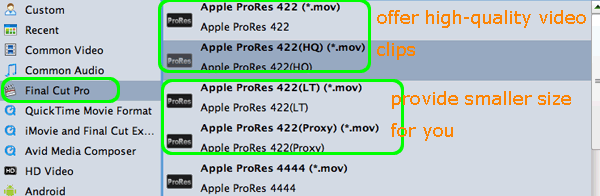
To get rid of this trouble, a wise option is to convert the C300 Mark II XF-AVC codec to ProRes(in proper settings) for Final Cut Pro. In this case, you need the help from Brorsoft MXF Converter for Mac, a professional 4K MXF converter app. It provides optimal presets such as Apple Prores 422, Apple ProRes 422(HQ), Apple ProRes 422 (LT), Apple ProRes 422 (Proxy), and Apple ProRes 4444 for Final Cut Pro; Apple InterMediate Codec for iMovie; DNxHD for Avid Media Composer, etc.
If you’re facing problems importing/editing the C300 MKII 4K footage in FCP X or FCP 7/6, chances are you already installed this great utility. If not, download it from here.
Guide of Transcoding Canon C300 Mark II 4K XF-AVC to ProRes for FCP X/7/6
Step 1. Load C300 Mark II footage
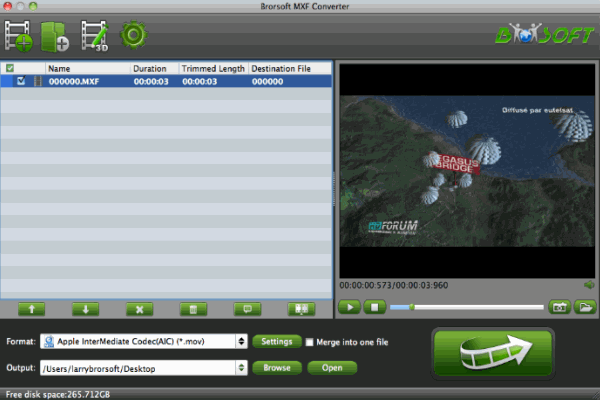
Launch the program and click “Add” button to import the Canon C300 MKII 4K MXF files to the top MXF to ProRes Converter Mac. Batch conversion is supported.
Step 2. Specify output format
Click on the “Format” bar and get the dropdown menu, then move your pointer to choose “Final Cut Pro> Apple PreRes 422” as the output format.
Step 3. Start the conversion
Click the “Convert” icon under the preview window, and the Mac MXF to FCP Converter will start transcoding C300 MK II footage to Prores MOV for FCP X on Mac.
After the conversion, click the “Open” button to locate converted files, then load ProRes .MOV files in FCP (X). Now you can successfully and easily import Canon C300 Mark II 4K MXF files to FCP 6/7 or FCP X for editing with best quality.
Additional Tips:
1. If you are also a FCP X user, before you try to do the conversion, don’t forget to make sure that you have installed the Apple ProRes Codec manually since the FCP X asks users to install it by themselves.
2. The Mac MXF Converter also supports professional encoders like Apple Intermediate Codec, DNxHD, MPEG-2, allows you to convert MXF files to seamlessly fit iMovie, Avid, Premiere, etc.