
In this article, we present how to transcode AVCHD, MTS, M2TS etc. to DNxHD MOV for HitFilm 4/3 Express in detail.
Question: Help! Trouble with .MTS files | Hitfilm 4 Express
“Hi guys
So I am very new to the whole editing thing so bear with me. I just downloaded hitfilm 4 express and I keep having problems with all my files in .mts format. At first it said it wasn’t supported when I tried to import it. I managed to fix it by updating quicktime and it was able to import just fine. However, when I imported a video clip I took with my Canon C100 II, I previewed the clip it was playing as if it were in slow motion. The footage was slow and laggy and so was the audio. Even when I placed the clip in the timeline it played back all choppy and laggy. Is there anyway I can fix this problem?”

Best Answer:
Talking about video editing, the tech support at HitFilm has assured that the best video codec to use for editing with HitFilm is the Avid DNxHD codec and also for the video format to be .mov. That’s why users often have the needs to convert their source files (AVCHD, MTS etc) to DNxHD MOV for HitFilm even though these files are among this software supported import category.
Brorsoft MTS Converter for Mac is just one of the best AVCHD Converter for you to transcode MTS/M2TS files for Avid smooth editing on Mac (macOS Sierra/El Capitan included). The program is capable of converting Canon/Panasonic/Sony/JVC AVCHD to DNxHD, MPEG-2, Apple ProRes, AIC, etc on Mac OS X for smoothly importing and editing in various non-linear editing systems (NLE), including Hitfilm 4/3/2/1, Adobe Premiere Pro, Final Cut Pro, iMovie and more. If you’re using a Windows PC, please turn to its equivalent Windows version – MXF Converter. Below is the workflow of AVCHD MTS M2TS to DNxHD MOV conversion.
 (Note: Click here for OS X 10.5)
Converting MTS for editing in Hitfilm 4 Express
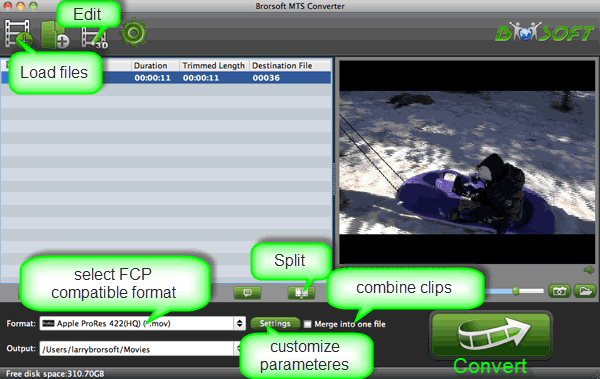
Step 1: Install and run MTS Converter on Mac. Drag and drop MTS videos to this software. Or you can click “Add” button to import your MTS videos to the program.
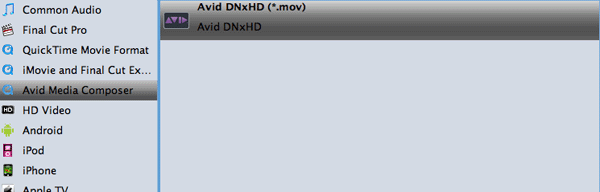
Step 2: Click format column to Choose Avid Media Composer->Avid DNxHD(*.mov) as output format for Hitfilm 4.
Step 3: Tap convert button to start transcoding MTS to DNxHD for Hitfilm.
Tip:
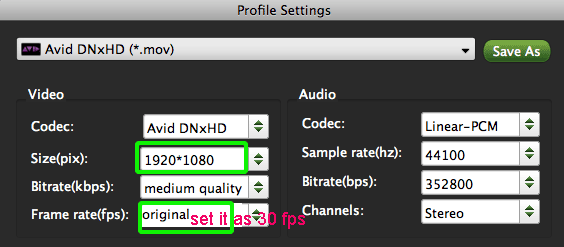
Adjust the video and audio parameters as the below screenshot, including the Bitrate of Video&Audio, Video Size, Sample Rate, Frame Rate, Audio Channels, etc., by clicking the “Settings” button on the main interface for getting the best quality before starting conversion .
Further Reading:
Convert MXF to QuickTime MOV : If you have lots of MXF files, chances are you want to convert your camera MXF videos to QuickTime MOV format for uses in Apple software like QuickTime, iMovie and devices like iPhone, iPad, iPod touch etc.
Convert avchd MXF to iTunes: MXF files can’t be directly imported to iTunes. So if you want to add MXF video files to iTunes for file management or syncing to Apple devices, you need to convert MXF to iTunes supported formats first.
Import MXF to Adobe Premiere: Wanna convert your MXF files to Adobe Premier without quality loss? Consider it done here. This article can surely help you convert MXF to Adobe Premiere compatible formats, so you can import MXF files to this app for video editing without any trouble.
Convert MXF to Any Format on Computer: Brorsoft MXF video converter for Mac allows you to convert MXF video files to any audio and video format, even device etc.
Pingback: How to Solve Sony Handycam HDR-CX106 video and Pinnacle Studio issues – DigitalCam Workflows